Showing posts with label sifa karadeniz. Show all posts

Thursday, 13 January 2011

Evaluation 4

Statistics
Here is a shot of the ratings for our music video. For a more clear viewing please click on the link below.

Our final music video


 Audience feedback


Audience feedback allows you to understand what people think about your music video. We had both positive and negative feedback which allowed us to view our strengths and weaknesses. Being able to understand the strengths and weaknesses will help us in our future projects. Many people really liked our location shots, we had a variety of shots in Piccadilly and Tower bridge we chose to film in these locations because they are iconic places that represents London and ideally the song American Boy includes lyrics about London.  So therefore we thought it would be conventional to use iconic location shots. We also had a lot of feedback about the costumes we used. For example the audience thought the costume really fitted in with the genre of our music. The performance the two artist displayed was believable and the connection between them was good. We tried to make sure that the two artist were able to have a bond, creating a good bond between them was actually really easy because they happened to get along very well. We were also praised on our editing because the audience thought the editing was up to beat. Having the editing up to beat is important because it keeps the audience in focus with the video. We were told that the camera shots and editing emphasized the narrative. On the other hand one of our weaknesses was our lighting, the audience thought in some shots the lighting could of been brighter. I also do partially agree with this point however because we shot our video during the night we had no natural lighting to reinforce  the cameras lighting. Another one our weak point was with our camera shot. For example there was a shot in the video where the female artist was dancing around a pole in Piccadilly. We only  used a long shot and a medium shot however the audience felt that having a close up would allow the audience to have a better viewing of the artist. Overall all this feedback really help me understand our strengths and weaknesses therefore in our future projects i will consider these feedback's.

Evaluation 3

There were many aspects of the media technology that helped us achieve all the work that we have produced for this a2 media course. 

Use of internet
Vimeo
At some point we had to use vimeo to look at previous A2 students work. This allowed us to get a clear understanding of what we could and should be achieving.

 Muzo.Tv
 There were countless times when we had trouble on being able to embed videos from You tube so eventually we found a site called Muzo.Tv. This site allowed me to embed every video that i wanted to upload on to blogger. Overall i thought it was very handy and easy to use.

Wikipedia
 Wikipedia gives you all the information you need, For example when i needed to track down information about my artist and the music video it was so simple. Wiki provides you with all the important information that is needed. I found it very helpful when i was searching about the genre and background of the artist.

Google
 Google is a very common site in fact many people use Google as their internet homepage. This site is basically like a door to information, news, images, videos, maps and many more things. I would have to say Google was one of the most helpful sites that i have used during this course. 

Blogger
Blogger is where we gather all our information and share it with others. Blogger has allowed us to express our work. Blogger is very useful to share information, it allowed us to present our work in creative ways. For example we are able to use images and videos to illustrate our work which makes the work more interesting.
You Tube
You Tube is a video sharing website on which users can upload, share, and view videos, created by three former PayPal employees in February 2005. You Tube also allows to share videos and watch videos. This site was particularly helpful because it allowed us to search for different types of music videos from different type of genres. The down side for me was that i found it annoying not being able to embed certain videos.


During our filming we used many technical equipments. For example We used a recording camera to record shots for our music video, We also used lights that we were able to attach on top of the camera, because our filming took place at night  the additional camera really helped us out. We also used a mini loudspeaker which allowed us to sing in sync with the song. The tripod supported the camera for   our still shots. Lastly we used a still camera to capture images for our storyboard, location shots and images for our digipak and advertisements.


The Mac has provided us with many programs that helped us with producing our work. For example it had programs such as photo shop which i personally used to create my advertisement and digipak. It also includes programs like Final Cut Pro where we did all our editing.
We were given three memory cards. Two for the recording camera and one for the still camera. We used these memory cards to safely keep all our shots and images.
The still camera was very handy. We were able to take images at all times. whilst filming, editing and during practice.
 
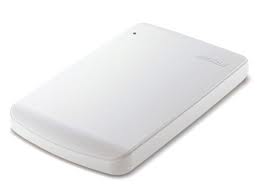
The hard drive allowed us to safely store all our work. Every shot and image that we took we eventually saved it in our hard drive. Every group was given their own hard drive with their own group number displayed on it.

 The card reader allowed us to connect our memory card to the Mac.

Photoshop
Here are some screen shots from my ancillary products. I used photoshop to create my digipak and advertisement. This program provides you with tools which allows you to make your work very interesting.
 
This tool here shows you your history of layers, so if some point you want to turn back and delete something this tool will allow you to do so.


To create this video i used a program called iMovie. This is a program on the Mac, it is very useful when creating small clips. In this clip i have illustrated shots from our filming process. And to take these shots we used the still camera. so overall the media technology really allows you to produce interesting and good work.

Evaluation 2

A successful Music video will make clear visual links between it and it's ancillary products which is as displayed above, which is displayed just below. I challenged this in some ways. For example i chose to use large black and white images despite the fact that our video was not black and white. I used large images to illustrate the artist so therefore i didn't feel the need to use exact visual aspect from the music video. There were many location shots of iconic places in London that took place in our music video but instead of presenting these shots i chose to keep it clear and simple. I only used images of the artist to make sure all the focus was ideally on the her. On the other hand i do believe that the audience can make visual links between the two media products. The reason for this is because the artist was mainly dressed in black with the same hairstyle, and also had the same style of make up through out the whole music video.
Ancillary Products 
                                                        Back cover                      Front Cover

Advertisement
                                                    
 Feed Back On My Ancillary Products


Here are some screen shots from my music video along side images from my digipack and advertisement. The black and white images represents photographs from my digipak and the colored images represent screen shots from my music video.


Overall i do believe that there are visual links between my music video and ancillary products.

Evaluation 1

Everyone listens to different types of music from different genres. For example, my group was interested in R&B and hip hop so therefore we chose to use a song from that particular group of genre.  Every song has a music video that reinforces their genre. As a group we really wanted to create a music video that would be unique but also conventional. There were many music videos that influenced us. For example, we used certain aspects from the original music video to American boy.
As you can see in the original American boy video clip the artist Estelle is shot with Kanye West, who also features in the video. We also wanted a shot where the two artists would dance next to each other. However we didn’t accurately manipulate the shots. As you can see in the original video they use a white background on the other hand our shot is located in Piccadilly. Please click on the image of Estelle and Khanye West, this is where we grasped some of our dance movements.

This particular shot where Kanye West supposedly sings into Estelle’s ear is one of my favourite shots. We also wanted to use a shot like this in our video however we did change some aspects such as our location and the positioning of the artists were different. Many music videos use this shot where the male character is singing or talking very close to the female. For example Enrique  Iglesias uses a shot like this in his Heartbeat video that features Nicole Scherzinger. I believe that this particular shot creates sexual tension.

This is a screen shot from Cheryl Coles Flood music video. This shot is a medium close up of Cheryl where she uses her hands to add movement to the shot. Rather than to have the artists arms by her side which would make the shot boring we also chose to use a shot similar to Cheryl’s.
Rihanna
Chris Brown & Keri Hilson
Beyonce
Many R&B music videos have sexy women to mainly attract the male audience. We wanted to use a shot where we could display the sexiness of the artist. Super sexy videos are a part of modern society so therefore the audience expects to see sexy men but mostly women in videos. And because it’s so common many music videos use women as sex symbols they do this by dressing the ladies in revealing clothes with attractive make up.  
 Here is an example of a music video that uses sexy girls who dance in a seductive way just like Beyonce does in this video. Beyonce - Baby Boy.

Album Cover
Rihanna - R Rated album
From the very start i was determined to have my digipak Black and white. I personally really like black and white images it makes me this there's a hidden story behind the image. Its calming and plain. There are many stars who choose to have their digipak black and white. For example Rihanna has used black and white images countless times, she used it for her R Rated Album as shown above and for her A Good Girl Gone Bad album. However i did add a red to my digipak. I think red is one of the best colors that stand out on a black and white image.
My album Cover
I think having a large image as your front cover really makes the image noticeable and furthermore having the artist stare into the camera allows the audience to relate to the artist. 
 
 Beyonce - I am Sasha Fierce album cover
This album cover has been one of my favorites for a while now. I love the way Beyonces arms are composed, the black and white effect makes her look almost metallic. She looks very graceful and this image actually sticks to my mind, its very memorable. Overall this image really influenced me to have a full on face black and white image on my front cover.

Digipak and Advertisement 
Rihanna - R Rated Advertisement 

 
 My Advertisement

The main reason why i chose to have my advertisement and digipak images black and white was because i was strongly influenced by Beyonces striking black and white images. Black and white images have a classic look to it and i believe its suitable for a wide range of genre.
Beyonce - I am Sasha Fierce advertisement

Friday, 7 January 2011

Production: Completed advertisement.

Completed advertisement

Production: Completed Digipak.

Digipak

Planning: Mock up of my advertisement.

Advertisement 
The advertisement will include information about the release date, album cover, artist name and the production company.

Planning: Mock up of my Digipak.

4 Panel Digipak
Front cover
The front cover of my digipak will have a large close up image of me as i am the artist. The images i will be using will all be black and white. I will also use the artist and the albums name on the front cover. The text will be written in dark red as i like the contrast between red and black & white. 

The back cover
The back cover will have an black and white image of me facing towards the left where my track list will be listed in red and black. I will also have  information about copyright in a small font on the bottom center. My bar code will be placed on the right hand bottom with the artist's web pages listed just underneath the bar code in red with small font. I will place the production and distribution company that we created ourselves just on top of the bar code. 

The inside covers
The inside covers will consist of two different black and white pictures of me. The cd will be white with the track list written on it with red, also the cd will have the artists and albums name on it.

Planning: Photos that will be used on digipak and advertisement.

Photos
Most of the images I have chosen to use have a thoughtful facial expression. I wanted the images to relate to the album name 'rumors' so therefore I posed in a way it seemed like I was thinking about rumours.